CGR Labs Day 1: Building a K3s Cluster for AI and SaaS
 Ciprian · · 10 min read
 What do you do when you keep reading about open source models, people getting excited about what comes out of the Alibaba labs, and z.ai release GLM 4.6, but your home PC can barely run a 7B model? Well, you either start buying GPUs or you build a lab in the cloud. I can’t afford 4 × RTX 5090s, and a GPU rig in the cloud runs about $2k/month. So, I’m going to try CPU-based inference instead. Granted, it will be much slower, and I’m not going to train or fine-tune anything on this server, but I think we can still have some fun and learn new things without contributing to NVIDIA’s stock price.
First things first, we hit the Hetzner auction site, and I found this pretty EPYC (sorry) deal: an AMD EPYC 7502 server with 32 cores, 64 threads, 320GB RAM, and a 960GB NVMe drive in a Finnish datacenter.
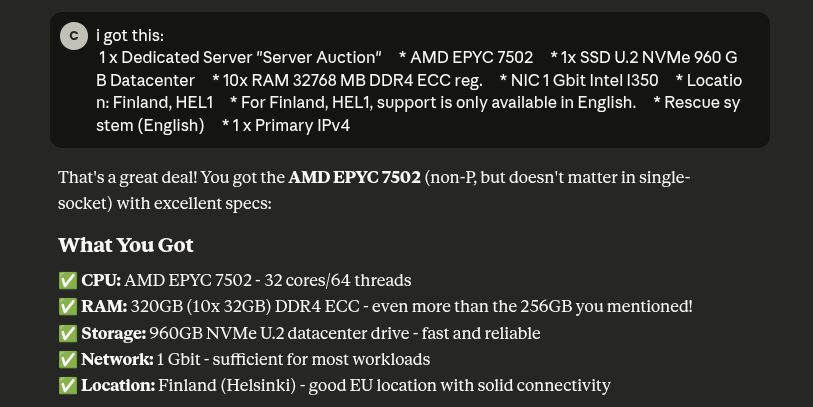
Claude was especially pleased with my decision after some back and forth about Intel vs AMD and what exactly I could use this server for. Main purpose is running inference and testing out open source models as well as hosting my apps and who knows what else the future brings.
The Setup
I always thought Kubernetes is really only worth it when it’s on bare metal, so we’ll put that theory to the test. Here’s what I’m thinking in terms of organization:
1. blog namespace
- The Computer Generated Reality blog you are currently reading
- Single deployment
2. saas namespace
- Various SaaS apps I’ll want to deploy
- Each app as separate deployment
- Each with its own ingress for different domains
3. ai-production namespace
- Stable, production-ready model(s)
- Used by SaaS apps
- High availability, resource guarantees
- Model(s) I trust and won’t frequently change
4. ai-experimental namespace
- Development/testing models
- For coding assistance and experimentation
- Can swap models freely without affecting production
- Lower priority resource allocation
5. monitoring namespace
- Prometheus + Grafana
- Might also add Sentry and OTEL
Here’s a rough sketch of what things will look like. Production models will most likely change from llama.
┌──────────────────────────────────────────────────────────────────────┐
│                          EXTERNAL (Internet)                         │
│                                                                      │
│  blog.domain     app1.domain.com    app2.anotherdomain.com           │
│  ai-dev.com   ai-prod.com (all point to server IP: xxx.xxx.xxx.xxx)  │
└────────────────────────────────┬─────────────────────────────────────┘
                                 │
                                 │ HTTPS (ports 80/443)
                                 │
┌────────────────────────────────▼─────────────────────────────────────┐
│                    AMD EPYC 7502 Server (Helsinki)                   │
│                 32 cores / 64 threads / 320GB RAM                    │
│                                                                      │
│  ┌────────────────────────────────────────────────────────────────┐  │
│  │                    TRAEFIK INGRESS                             │  │
│  │              (Routes traffic based on hostname)                │  │
│  └───┬──────────────┬─────────────┬────────────────┬──────────────┘  │
│      │              │             │                │                 │
│ ┌────▼──────┐  ┌────▼──────┐ ┌───▼─────────┐  ┌───▼──────────────┐   │
│ │ Namespace │  │ Namespace │ │  Namespace  │  │   Namespace      │   │
│ │   BLOG    │  │   SAAS    │ │AI-PRODUCTION│  │ AI-EXPERIMENTAL  │   │
│ ├───────────┤  ├───────────┤ ├─────────────┤  ├──────────────────┤   │
│ │           │  │           │ │             │  │                  │   │
│ │ ┌───────┐ │  │ ┌───────┐ │ │ ┌─────────┐ │  │ ┌──────────────┐ │   │
│ │ │ Blog  │ │  │ │ App1  │ │ │ │ Llama   │ │  │ │ Llama        │ │   │
│ │ │ Pod   │ │  │ │ Pod   │ │ │ │ 70B Q4  │ │  │ │ Experimental │ │   │
│ │ └───────┘ │  │ └───────┘ │ │ │ (Stable)│◄├──┼─┤ (Swappable)  │ │   │
│ │           │  │           │ │ │         │ │  │ │              │ │   │
│ │ Resources:│  │ ┌───────┐ │ │ │ OR      │ │  │ Resources:     │ │   │
│ │ 0.5 CPU   │  │ │ App2  │ │ │ │ Multi   │ │  │ 6-12 CPU       │ │   │
│ │ 512MB RAM │  │ │ Pod   │─┼─┼─► Models: │ │  │ 32-80GB RAM    │ │   │
│ └───────────┘  │ └───────┘ │ │ │ 8B+34B  │ │  │                │ │   │
│                │           │ │ └─────────┘ │  │ 1 replica      │ │   │
│                │ Resources:│ │             │  │ (experimental) │ │   │
│                │ 2 CPU     │ │ Resources:  │  │                │ │   │
│                │ 4GB RAM   │ │ 12 CPU      │  │ Optional       │ │   │
│                │ per app   │ │ 128GB RAM   │  │ Ingress for    │ │   │
│                └───────────┘ │             │  │ external       │ │   │
│                              │ 2 replicas  │  │ access         │ │   │
│                              │ (HA)        │  │                │ │   │
│                              │             │  └──────────────────┘   │
│                              │ Internal    │                         │
│                              │ only        │                         │
│                              │ (no public  │                         │
│                              │  ingress)   │                         │
│                              └─────────────┘                         │
│                                                                      │
│  ┌───────────────────────────────────────────────────────────────┐   │
│  │             Namespace: MONITORING                             │   │
│  ├───────────────────────────────────────────────────────────────┤   │
│  │  ┌─────────────┐  ┌─────────────┐  ┌──────────────────────┐   │   │
│  │  │ Prometheus  │  │   Grafana   │  │  Node Exporter       │   │   │
│  │  │             │  │             │  │  kube-state-metrics  │   │   │
│  │  │ Metrics DB  │◄─┤ Dashboards  │◄─┤                      │   │   │
│  │  └─────────────┘  └─────────────┘  └──────────────────────┘   │   │
│  │                                                               │   │
│  │  Resources: 2 CPU, 4GB RAM                                    │   │
│  │  Ingress: monitoring.yourdomain.com (optional, with auth)     │   │
│  └───────────────────────────────────────────────────────────────┘   │
│                                                                      │
│  ┌──────────────────────────────────────────────────────────────┐    │
│  │                    KUBERNETES (K3s)                          │    │
│  │  • CoreDNS: Internal service discovery                       │    │
│  │  • cert-manager: Automatic SSL certificates                  │    │
│  │  • Local-path storage: PersistentVolumes on NVMe             │    │
│  └──────────────────────────────────────────────────────────────┘    │
│                                                                      │
│  ┌──────────────────────────────────────────────────────────────┐    │
│  │              STORAGE (960GB NVMe U.2)                        │    │
│  │                                                              │    │
│  │  /mnt/models/production/                                     │    │
│  │    ├── llama-70b-q4.gguf        (40GB - large, powerful)     │    │
│  │    ├── llama-8b-q4.gguf         (5GB  - fast, efficient)     │    │
│  │    └── deepseek-34b-q4.gguf     (20GB - specialized)         │    │
│  │                                                              │    │
│  │  /mnt/models/experimental/                                   │    │
│  │    └── current/  → codellama-13b-q4.gguf (swap freely)       │    │
│  │                                                              │    │
│  │  /mnt/app-data/            → SaaS app databases/storage      │    │
│  │  /mnt/monitoring/          → Prometheus metrics storage      │    │
│  └──────────────────────────────────────────────────────────────┘    │
└──────────────────────────────────────────────────────────────────────┘
SaaS apps will require backups, I’ll most likely use something like a Storage Box from Hetzner for it.
Resource Allocation
Final resource allocation looks something like this:
| Component | CPU | RAM | Storage |
|---|---|---|---|
| AI Production | 12 cores | 128GB | 200GB (models) |
| AI Experimental | 6-12 | 32-80GB | 200GB (models) |
| PostgreSQL Shared | 4 | 8GB | 100GB (data) |
| Redis (optional) | 1 | 2GB | 10GB (cache) |
| SaaS Apps (2-3 apps) | 4-6 | 8-12GB | 50GB (uploads) |
| Blog | 0.5 | 512MB | 5GB |
| Monitoring Stack | 2 | 4GB | 50GB (metrics) |
| Backup Jobs | 1 | 1GB | 100GB (staging) |
| System (K8s + OS) | 4 | 8GB | 50GB |
| Reserve/Buffer | 1-7 | 136-180GB | 195GB |
Time to Get Our Hands Dirty
I’ll start with enabling the Ubuntu OS on the server.
After enabling the OS, I also had to trigger a manual reset of the server. Then I got the email confirmation from Hetzner that my OS has been installed and is ready to use.
Host hetzner-1
    HostName <ip of the machine>
    User cgr
    IdentityFile <private key path>
We’ll go with k3s for our kubernetes layer. Claude makes some good points there:
Why K3s for Your Setup?
- Production-ready
- Single-node optimized
- Low overhead (leaves more RAM for your AI models!)
- Built-in ingress (Traefik)
- Easy to install and maintain
- Well-documented
- Large community
For my use case (single server, production workloads, AI inference), K3s is the best choice.
curl -sfL https://get.k3s.io | sh -
Checking the installation:
systemctl status k3s
k3s was successfully installed and it was at this point that I realized I hate my shell and I need to install zsh:
sudo apt install -y zsh
Ok, this looks much better but here comes the biggest issue I forgot to address: Hetzner bare metal servers come with root as the user configured for my private key. Let’s fix that.
After creating my user, we’ll remove zsh and lock out root.
sudo rm -rf /root/.oh-my-zsh /root/.zshrc
sudo chsh -s /bin/bash root
sudo nano /etc/ssh/sshd_config
sudo systemctl restart sshd
exit
Let’s Get Back to Setting Up K3s
Set up kubectl:
mkdir -p ~/.kube && sudo cp /etc/rancher/k3s/k3s.yaml ~/.kube/config && sudo chown $USER:$USER ~/.kube/config
Next let’s set up the storage folders and namespaces. Actual storage will be set up with volume claims when we get to that point, right now we’re just creating the physical organization.
sudo mkdir -p /mnt/{models,production,experimental,postgres-data,redis-data,app-data,monitoring,backups/local}
Create namespaces:
kubectl create namespace blog
kubectl create namespace saas
kubectl create namespace ai-production
kubectl create namespace ai-experimental
kubectl create namespace monitoring
Now that we need to start configuring the infrastructure I figured storing the config files in a repo would be a good idea, so we’ll do that.
mkdir cgr-infrastructure
cd cgr-infrastructure
git init
Here I realized I forgot to configure an ssh key for this machine so I did that next.
Getting Back to K3s: Setting Up Let’s Encrypt
mkdir -p k8s-configs/{core,blog,saas,ai,monitoring}
nano k8s-configs/core/letsencrypt-prod.yaml
Applied the ClusterIssuer:
kubectl apply -f k8s-configs/core/letsencrypt-prod.yaml
Next I would like to improve security so I’ll set up a Cloudflare free plan and start managing my domains from there. I generally buy domains from NameCheap as it’s cheaper but Cloudflare offers far better protection even with their free plan.
Now that Cloudflare is set up, I added the DNS record to point my domain to the server IP. We still need to wait for that to propagate. Meanwhile, we’ll set up the blog with Hugo.
I also added a deploy file to the github repo so that the blog image gets built and published to ghcr.io (github container registry). Also had to create a new PAT for the k3s server so it can pull images from there. Then I added the blog deployment to the blog namespace.
kubectl apply -f ~/cgr-infrastructure/k8s-configs/blog/blog-deployment.yaml
Setting Up PostgreSQL
Still waiting for the DNS propagation so next I’ll set up the postgresql deployment.
For the admin user I’ll just create a secret directly using kubectl create secret, each app will have its own user/password which will be managed with .env files later on.
kubectl get pods -n saas

That’s it for now, I’ll wait for the DNS propagation to complete and finalize setting up the blog.
Next Steps
- Set up my local kubectl to connect to the cluster so I don’t need to ssh into it
- Change the blog domain, seems kind of hard to write
- Set up the AI inference deployments with llama.cpp (Production + Lab)
- Deploy my first app to the SaaS namespace
- Try to configure my VS Code Github Copilot to work with a model from my Lab
A Pretty Big Note
Somewhere along the way I messed up. I am still not sure if it was because of me or simply the way the server came configured from Hetzner or how k3s installs CoreDNS. The point is, after some waiting I realized that since Cloudflare is actually proxying traffic to my device, there’s no need to wait for DNS propagation. And yet my blog was not working. That lead me unto a side quest that took about 2 hours to figure out. I felt that deserves its own post.